There's never any shortage of people debating mobile web apps vs. native apps. I don't want to waste your time with yet another rehash of this debate. Personally I sum it up as a choice between user experience and cost. But obviously I am biased -- I build native apps and even wrote a book on how to do it. So you shouldn't believe anything I have to say about this topic, it must be wrong. Anyways, one of the interesting lines of reason that often comes up in this debate is how web apps replaced desktop apps. I want to examine this a little bit closer.
I'm actually writing this blog post from a Chromebook that I got for attending the Google I/O conference last month. This device is perhaps the logical conclusion of the web apps replacing desktop apps axiom. However, I have a problem with that axiom. It is often based on the emergence of popular websites like Yahoo, Google, Amazon, and eBay. The argument is that these apps were web based and the fact that they ran on servers that could be rapidly updated is a key to why they succeeded. The long update cycle of desktop software would have made it impossible for these apps to be anywhere but in a browser.
There is some truth in this, but it's misleading. The most important factor in the success of those apps was that their data was in the cloud. They brought information and interactions that could not exist simply as part of a non-connected desktop app. They had business models that were not based on people paying to install the software. These were the keys. The fact that end users interacted through a web browser was secondary. It's pretty much the same story for newer super popular web apps like Facebook and Twitter.
Going back to the world of mobile for a minute... One of the things that mobile has taught us is that users don't care so much about how they interact with your "web-based" application. Hence the popularity of native apps for web giants like Amazon and Facebook. In fact, some might even argue that users prefer to use native apps to interact with traditional web properties. I won't argue that, but I would definitely disagree with any claims that users prefer to use a browser.
Anyways, the point is that the notion that web apps replaced desktop apps is dubious. In fact, if you look at places where web apps were tried to exactly replace desktop apps, such as word processing, they have had limited success. Currently we see a movement to replace music players like iTunes with web apps. These web apps have some distinct advantages, but it is not at all clear that they will prove popular with users. Apple has taken the approach of adding more network based features (store and download your music from their servers) to iTunes instead of going with a web app -- at least for now.
Connected desktop apps have a lot to offer. I often find myself using desktop apps like Twitter, Evernote, Sparrow (for GMail), and Mars Edit (for Blogger.) They provide a better experience than their browser based cousins. Apple's Mac App Store has definitely made such apps more popular on the Mac platform, as they have made it easier to discover, purchase, and update such apps. Speaking of updates, these apps update frequently, usually at least once a month. Again, I think that our expectations have adjusted because of mobile apps.
So will desktop apps make a comeback? Are mobile web apps doomed? I don't know. I think it is very unclear. It's not a given that a computer like this Chromebook that I'm using is "the future." We can haz network without a browser.
Last month I wrote a bit about cloud music. Since then Apple got in the game with iTunes in the iCloud. I'm not a fan of it because you have to manage what songs are downloaded to your devices before you can listen to them. Of course having to download a song before you can listen to it is not surprising from a company that sells hardware priced by storage capacity. If you didn't have to download to use your media, why would you spend an extra $100 on the 32gb iWhatever instead of the 16gb version? Still you gotta give Apple props on the price point. I am optimistic that competition around price and features between Apple, Google, and Amazon will be very beneficial for consumers.
Anyways while the your music-in-the-cloud market is obviously very hot market being contested by three of the biggest technology companies in the world, there is a lot more interesting innovation around music going in in technology. This blog post is about two of my favorite music startup/services: Rdio and Turntable.fm. There's tons of tech press on each of these companies, so I won't go into that. I'm just going to talk about why I like them.
Rdio launched in late 2010, and I've been a paying customer since January 2011. It's conceptually similar to subscriptions services like fake Napster and Rhapsody. What I like about it is how great it is to use on mobile devices. I have it on my Nexus S, on my Nexus One that I listen to when I run/work-out, and on the iPod Touch that I have plugged in to my car. Now you might be thinking, now how can I use this on a iPod in my car with no internet connection? Well you can mark songs/albums/playlists as songs to sync to your devices and be usable with no connection. So I can use the Rdio Mac app, mark some songs, and then just connect my iPod or Nexus One to a wifi network, and the songs get synced. Then I can listen to them anytime. I regularly read reviews of new music on Metacritic, listen to some of the music I find there on Rdio, and then sync it to my devices. Then I can listen to it while running or driving to work.
Speaking of discovering new music, that is the sweet spot of Turntable. It's pretty new, I only heard about it earlier this month and started using it this week. The idea of being a DJ for the room may sound lame at first -- and maybe it is -- but it is also awesome. However I will warn you to resist being a DJ. You will be drawn in and waste massive amounts of time. It's completely unnecessary too. Like I said, Turntable is awesome for music discovery. Go to a room that sounds interesting (avoid the Coding Soundtrack unless you really enjoy electronica/dance AND don't mind witnessing pissing contests measured by playing obscure remixes) and enjoy. There's a good chance that you will hear familiar music, but an even better chance you will hear something you've never heard before. The DJs try hard to impress, and you win because of it. It's like Pandora, but better, with no ads, and ... you always have the option to enter the chat or even take your turn at DJ'ing.
When people talk about smartphones, they often mean iPhones and Android phones. Sure there are still Blackberries out there, I think I once saw a guy using a webOS phone, and Microsoft has 89,000 employees who have to use Windows Phone 7, but it's mostly an Android and iPhone world right now. If you have a phone running Android or iOS, life is pretty good. You've probably got a really powerful phone, with a huge number of apps and games to choose from. You've also got a web browser that's more advanced than the one used by most desktop computer users. So given all of those things to be happy about, why is that smartphone owners are so hostile to each other?
iPhones user love to look down their noses and make derisive comments about Android users. Not to be outdone, Android users never miss an opportunity to mock iPhone users. There is an obvious parallel here to Mac vs. Windows, but I think it's actually much nastier than Mac vs. Windows ever was. Here's a list of my theories (in no particular order) on why there is such animosity.
It's so easy to do. The truth is that both iOS and Android are deeply flawed. Going back to the Mac vs. Windows comparison, think about how much less mature these smartphone OS's are compared to Windows and OSX. So if you have any inclination to make fun of either OS, it's embarrassingly easy to do. This is where things really differ from Mac vs. Windows. There's not much to debate there. If you wanted to say "Mac sucks", there is a short list of things that you can point to. Not true for iOS or Android.
Social networking. In this day and age of social networks, your "friends" shove what they are doing in your face constantly. Smartphone apps make heavy use of this, as a way to spread virally. But what happens when there is an impedance mismatch caused by apps available on one OS but not the other? The folks with the unsupported OS get a little annoyed, and the other folks get an artificial feeling of 133tness
It starts at the top. Apple and Google both frequently take shots at each other. They do it at developer conferences. They do it when reporting quarterly earnings. It doesn't stop there. Motorola, Verizon, T-Mobile and others have all taken shots at Apple in commercials seen by millions.
Big decisions. You only have one smartphone (unless you are weird like me) and in the US, you usually buy it on a two-year contract. So you have to pick just one, and then you are stuck with it for two years. Thus if anybody is gonna suggest that you made a bad decision, most people will defend their decisions vehemently.
The Apple effect. So this really is straight out of Mac vs. Windows. Apple wants their products to seem elite and luxurious. They want the owners to feel like they have purchased far superior products, and feel that they (the user) is superior because of this. It's brilliant marketing, and it totally works. The air of superiority hangs over any Apple product owners, but especially iPhone users. So naturally any non-iPhone users are going to react negatively to the haute attitudes of iPhone users.
This week was WWDC 2011. Last year I was lucky enough to attend what appears to be the final stevenote. This year I followed along online, like much of Silicon Valley. There are a lot of reasons why so many of us who work in the tech world pay such close attention to the WWDC keynote. This is the place where Apple typically unveils innovative hardware and software. However, this year's event reminded me of another watershed moment in recent US history: John McCain choosing Sarah Palin as his VP candidate back in 2008.
These two events were similar because they were both examples of rallying the base. In 2008, McCain decided against trying to appeal to moderate Republican/Democrats/independents who were either inclined to vote for Obama or undecided. Instead he went with Palin, a candidate who did not appeal to those people. The idea was to appeal to the most conservative elements of the Republican party and get those people to vote instead of staying home for whatever reason. Obviously this did not work.
So how was WWDC 2011 a rallying of the base tactic? Apple did not try to introduce near software or hardware that would get non-iPhone owners to go out and buy an iPhone or more strongly consider buying an iPhone the next time they were in the market for a new phone. Instead they did their best to make sure that current iPhone owners continued to buy iPhones. The strategy was two-fold.
First, they needed the places where they were weak and other were strong. Now let's be honest here, by others we are talking about Android/Google. There were a couple of glaring problems with iOS 4. First was notifications, so Apple essentially adopted Android's model here. Second was the dependency on iTunes the desktop software application. They introduced wireless sync and their iCloud initiatives to address this weakness. Apple did not break any new ground in any of these areas, they simply removed some obvious reasons for people to buy an Android device over an iPhone.
Phase two of rallying the base was to increase lock-in. If you are an iPhone user, you already experience lock-in. Buying an Android phone means losing all of your apps and games. Depending on what you use for email, calendar, etc. you might also lose that data too. Of course this is true to some degree about any smartphone platform. However, with the expansion of the Android Market (I've seen many projections that it will be bigger than the App Store soon), pretty much every app or game you have on your iPhone can be found on Android. Further, there's a good chance that it will be free on Android, even if you had to pay for it on the iPhone. Further, with the popularity of web based email, especially GMail, you probably would not lose any emails, calendar events, etc. So the lock-in was not as high as Apple needed it to be. Enter iCloud and iMessaging.
As many have noted, iCloud/iMessaging does not offer anything that you could not get from 3rd party software. Syncing your docs, photos, email, calendar, etc. is something that many of us already do, and that includes iPhone users. Further many folks already have IM clients that do everything that iMessaging does. The big difference is that all of those existing solutions are not tied to iOS or OSX. Thus they are cross-platform (no lock-in) but that also means that you have to add this software to your devices. It's very nice for users to not have to worry about installing Dropbox, Evernote, or eBuddy. But the obvious win for Apple is here is the lock-in. If you start relying on Pages for writing docs and sync'ing them across devices, you are going to be very reluctant to buy anything other than an iPhone (and a Mac for that matter.) If you get used to using iMessaging to chat with your other iPhone toting friends, same thing.
Apple is keeping the cost of using all of their new offerings very low. It's a classic loss leader strategy. It's ok if iCloud and iMessaging both lose a lot of money for Apple. If they can just lock-in existing iPhone users, they can continue to make huge profits. In that scenario, it's ok for Google/Android to have N times the number of users as Apple. The Apple users won't be going anywhere, and they spend a lot of money. Seems like a smart strategy by Apple. It should work out much better than it did for the Republican party in 2008.
For nearly a decade now technology pundits have been talking about the end of Moore's Law. Just this week, The Economist ran an article about how programmers are starting to learn functional programming languages to make use of the multi-core processors that have become the norm. Indeed inventors of some of these newer languages like Rich Hickey (Clojure) and Martin Odersky (Scala) love to talk about how their languages give developers a much better chance of dealing with the complexity of concurrent programming that is needed to take advantage of multi-core CPUs. Earlier this week I was at the Scala Days conference and got to hear Odersky's keynote. Pretty much the second half of his keynote was on this topic. The message is being repeated over and over to developers: you have to write concurrent code, and you don't know how to do it very well. Is this really true, or is it just propaganda?
There is no doubt that the computer that we buy are now multi-core. Clock speeds on these computers have stopped going up. I am writing this blog post on a MacBook Air with a dual-core CPU running at 2.13 GHz. Five years ago I had a laptop with a 2.4 GHz processor. I'm not disputing that multi-core CPUs are the norm now, and I'm not going to hold my breath for a 4 GHz CPU. But what about this claim that it is imperative for developers to learn concurrent programming because of this shift in processors? First let's talk about which developers. I am only going to talk about application developers. What I mean are developers who are writing software that is directly used by people. Well maybe I'll talk about other types of developers later, but I will at least start off with application developers. Why? I think most developers fall into this category, and I think these are the developers that are often the target of the "concurrency now!" arguments. It also allows me to take a top-down approach to this subject.
What kind of software do you use? Since you are reading this blog, I'm going to guess that you use a lot of web software. Indeed a lot of application developers can be more precisely categorized as web developers. Let's start with these guys. Do they need to learn concurrent programming? I think the answer is "no, not really." If you are building a web application, you are not going to do a lot of concurrent programming. It's hard to imagine a web application where one HTTP request comes in and a dozen threads (or processes, whatever) are spawned. Now I do think that event-driven programming like you see in node.js will become more and more common. It certainly breaks the assumption of a 1-1 mapping between request and thread, but it most certainly does not ask/require/suggest that the application developer deal with any kind of concurrency.
The advancements in multi-core processors has definitely helped web applications. Commodity app servers can handle more and more simultaneous requests. When it comes to scaling up on a web application, Moore's Law has not missed a beat. However it has not required all of those PHP, Java, Python, Ruby web developers to learn anything about concurrency. Now I will admit that such apps will occasionally do something that requires a background thread, etc. However this has always been the case, and it is the exception to the type of programming usually needed by app developers. You may have one little section of code that does something concurrent, and it will be tricky. But this has nothing to do with multi-core CPUs.
Modern web applications are not just server apps though. They have a lot of client-side code as well, and that means JavaScript. The only formal concurrency model in JavaScript are Web Workers. This is a standard that has not yet been implemented by all browsers, so it has not seen much traction yet. It's hard to say if it will become a critical tool for JS development. Of course one of the most essential APIs in JS is XMLHttpRequest. This does indeed involve multiple threads, but again this is not exposed to the application developer.
Now one can argue that in the case of both server side and client side web technologies, there is a lot of concurrency going on but it is managed by infrastructure (web servers and browsers). This is true, but again this has always been the case. It has nothing to do with multi-core CPUs, and the most widely used web servers and browsers are written in languages like C++ and Java.
So is it fair to conclude that if you are building web applications, then you can safely ignore multi-core CPU rants? Can you ignore the Rich Hickeys and Martin Oderskys of the world? Can you just stick to your PHP and JavaScript? Yeah, I think so.
Now web applications are certainly not the only kind of applications out there. There are desktop applications and mobile applications. This kind of client development has always involved concurrency. Client app developers are constantly having to manage multiple threads in order to keep the user interface responsive. Again this is nothing new. This has nothing to do with multi-core CPUs. It wasn't like app developers used to do everything in a single thread, but now that multi-core CPUs have arrived, you need to start figuring out how to manage multiple threads (or actors or agents or whatever.) Now perhaps functional programming can be used by these kind of application developers. I think there are a lot of interesting possibilities here. However, I don't think the Hickeys and Oderskys of the world have really been going after developers writing desktop and mobile applications.
So if you are a desktop or mobile application developer, should you be thinking about multi-core CPUs and functional programming? I think you should be thinking about it at least a little. Chances are you already deal with this stuff pretty effectively, but that doesn't mean there's room for improvement. This is especially true if language/runtime designers started thinking more about your use cases.
I said I was only going to talk about application developers, but I lied. There is another type of computing that is becoming more and more common, and that is distributed computing. Or is it called cloud computing? I can't keep up. The point is that there are a lot of software systems that run across a cluster of computers. Clearly this is concurrent programming, so bust out the functional programming or your head will explode, right? Well maybe not. Distributed computing does not involve the kind of shared mutable state that functional programming can protect you from. Distributed map/reduce systems like Hadoop manage shared state complexity despite being written in Java. That is not to say that distributed systems cannot benefit from languages like Scala, it's just that the benefit is not necessarily the concurrent problems/functional programming that are often the selling points of these languages. I will say that Erlang/OTP and Scala/Akka do have a lot to offer distributed systems, but these frameworks address different problems than the multi-core concurrency.
It might sound like I am a imperative program loving curmudgeon, but I actually really like Scala and Clojure, as well as other functional languages like Haskell. It's just that I'm not sure that the sales pitch being used for these languages is accurate/honest. I do think the concurrency/functional programming angle could have payoffs in the land of mobile computing (desktop too, but there's not much future there.) After all, tablets have already gone multi-core and there are already a handful of multi-core smartphones. But these languages have a lot of work to do there, since there are already framework features and common patterns for dealing with concurrency in mobile. Event driven programming for web development (or the server in client/server in general) is the other interesting place, but functional languages have more to offer framework writers than application developers in that arena. My friend David Pollak recently wrote about how the current crop of functional languages can hope for no more than to be niche languages like Eiffel. I think that he might be right, but not just because functional programming has a steep learning curve. If all they can offer is to solve the concurrency problem, then that might not be enough of a problem for these languages to matter.
One of the exciting technologies being shown off at Google's I/O conference this year was near field communication or NFC. It certainly got my interest, so I attended an excellent talk on NFC. Here's a video of the talk:
One of the things mentioned in the talk was that you did not want to use NFC for any kind of long running, verbose communication. Its range was too short and its transfer speed was too slow. Bluetooth was the way to go for such data exchange, so what you really wanted to do was an NFC-to-Bluetooth handoff. It was even mentioned that the popular Fruit Ninja game did this, or would do this in the future. Earlier this week at Bump we had our second hackathon. I decided that local communication using NFC and Bluetooth would make for an interesting hackathon project. So based on what I had learned from the I/O presentation, the examples in the Andoird SDK, and a tip from Roman Nurik, here's some code on how to do the NFC-to-Bluetooth handoff to setup a peer-to-peer connection between two phones to exchange data between them.
We'll start with the NFC pieces. You want the phone to do two things. First, it needs to broadcast an NFC "tag". This tag can have whatever information you want in it. In this case we will have it send all of the information needed to setup a Bluetooth connection: the Bluetooth MAC address for our phone plus a UUID for our app's connection. You can add more stuff to the tag as well, but these two parts are sufficient. Technically you could do without the UUID, but you'll want this in case other apps are using a similar technique. Here is some simplified code for generating an NFC text record:
public static NdefRecord newTextRecord(String msg) {
    byte[] langBytes = Locale.ENGLISH.getLanguage().getBytes(
            Charset.forName("US-ASCII"));
    byte[] textBytes = msg.getBytes(Charset.forName("UTF-8"));
    char status = (char) langBytes.length;
    byte[] data = new byte[1 + langBytes.length + textBytes.length];
    data[0] = (byte) status;
    System.arraycopy(langBytes, 0, data, 1, langBytes.length);
    System.arraycopy(textBytes, 0, data, 1 + langBytes.length,
            textBytes.length);
    return new NdefRecord(NdefRecord.TNF_WELL_KNOWN, NdefRecord.RTD_TEXT,
            new byte[0], data);
}
This code only handles English/ASCII characters. Take a look at the Android samples for a more generic approach. Next we need to get the Bluetooth MAC address to pass in to the above function. That is simply: BluetoothAdapter.getDefaultAdapter().getAddress(). Now we can create the text record to broadcast using NFC. To do this, you need to be inside an Android Activity:
@Override
public void onResume() {
    super.onResume();
    NfcAdapter adapter = NfcAdapter.getDefaultAdapter(this);
    // code to generate a string called msg with the MAC address, UUID, etc.
    NdefMessage message = new NdefMessage(new NdefRecord[] { newTextRecord(msg) });
    adapter.enableForegroundNdefPush(this, message);
    // more code to come later
}
In this code there is a String called msg that I didn't show how it was generated. It would have the Bluetooth MAC address, as well as the UUID for your app, plus whatever else you want to include in the NFC broadcast. Now when your app loads, it will use NFC to broadcast the info needed for the Bluetooth handoff. The app needs to not only broadcast this, but also listen for this information as well:
@Override
public void onResume() {
    // see above code
    PendingIntent pi = PendingIntent.getActivity(this, 0, new Intent(this,
            getClass()).addFlags(Intent.FLAG_ACTIVITY_SINGLE_TOP), 0);
    IntentFilter ndef = new IntentFilter(NfcAdapter.ACTION_NDEF_DISCOVERED);
    try {
        ndef.addDataType("*/*");
    } catch (MalformedMimeTypeException e) {
        throw new RuntimeException("fail", e);
    }
    IntentFilter[] filters = new IntentFilter[] { ndef, };
    String[][] techLists = new String[][] { new String[] { NfcF.class.getName() } };
    adapter.enableForegroundDispatch(this, pendingIntent, filters, techLists);
}
This code configures an NFC listener using an IntentFilter and a type of NFC tag (there are many.) It uses a PendingIntent for this same Activity. So when a NFC tag that matches our criteria (based on the IntentFilter and tag type), then an Intent will be fired that will be routed to our Activity (because that's the Activity we put in the PendingIntent.) Now we just need to override the onNewIntent method of our Activity, since that is what will be invoked when an NFC tag is encountered:
@Override
public void onNewIntent(Intent intent) {
    NdefMessage[] messages = getNdefMessages(intent);
    for (NdefMessage message : messages) {
        for (NdefRecord record : message.getRecords()) {
            String msg = parse(record);
            startBluetooth(msg);
        }
    }
}
public static String parse(NdefRecord record) {
    try {
        byte[] payload = record.getPayload();
        int languageCodeLength = payload[0] & 0077;
        String text = new String(payload, languageCodeLength + 1,
                payload.length - languageCodeLength - 1, "UTF-8");
        return text;
    } catch (UnsupportedEncodingException e) {
        // should never happen unless we get a malformed tag.
        throw new IllegalArgumentException(e);
    }
}
For our example, there should only be one NdefMessage received, and it should have exactly one NdefRecord, the text record we created earlier. Once we get the message from the NFC tag, we it's time to start the Bluetooth connection. Bluetooth uses sockets and requires one device to act as a server while the other acts as a client. So if we have two devices setting up a peer-to-peer Bluetooth connection, which is one is the server and which is the client? There are a lot of ways to make this decision. What I did was have both phones include a timestamp as part of the NFC tag they broadcast. If a phone saw that it's timestamp was smaller than the other's, then it became the server. At this point you will want to spawn a thread to establish the connection. Here's the Thread I used:
public class ServerThread extends Thread {

    private final BluetoothAdapter adapter;
    private final String macAddress;
    private final UUID uuid;
    private final Handler handler;

    public ServerThread(BluetoothAdapter adapter, String macAddress, UUID uuid,
            Handler handler) {
        this.adapter = adapter;
        this.macAddress = macAddress;
        this.uuid = uuid;
        this.handler = handler;
    }

    @Override
    public void run() {
        try {
            BluetoothServerSocket server = adapter
                    .listenUsingInsecureRfcommWithServiceRecord(macAddress,
                            uuid);
            adapter.cancelDiscovery();
            BluetoothSocket socket = server.accept();
            server.close();
            CommThread comm = new CommThread(socket, handler);
            comm.start();
        } catch (IOException e) {}
    }

}
This Thread uses the device's BluetoothAdapter to open up an RFCOMM socket. Once you start listening, you'll want to immediately turn off Bluetooth discovery. This will allow the other device to connect much quicker. The server.accept() call will block until another devices connects (which is why this can't be in the UI thread.) Here's the client thread that will run on the other device:
public class ClientThread extends Thread {

    private final BluetoothAdapter adapter;
    private final String macAddress;
    private final UUID uuid;
    private final Handler handler;

    public ClientThread(BluetoothAdapter adapter, String macAddress, UUID uuid,
            Handler handler) {
        super();
        this.adapter = adapter;
        this.macAddress = macAddress;
        this.uuid = uuid;
        this.handler = handler;
    }

    @Override
    public void run() {
        BluetoothDevice remote = adapter.getRemoteDevice(macAddress);
        try {
            BluetoothSocket socket = remote
                    .createInsecureRfcommSocketToServiceRecord(uuid);
            adapter.cancelDiscovery();
            socket.connect();
            CommThread comm = new CommThread(socket, handler);
            comm.start();
        } catch (IOException e) {}
    }

}
On the client thread, you find the other device by using it's MAC address (not the client's.) Then you connect to it using the device using the shared UUID. On both client and server, we stated another thead for communication. From here on out this is just normal socket communication. You can write data on one end of the socket, and read it from the other.
I've played ESPN fantasy sports for many years. ESPN also creates one of my favorite mobile apps, their ScoreCenter app (though it could be sooo much better.) However their fantasy baseball app is one of the most frustrating apps out there. It provides access to your fantasy baseball teams. The other way to access your teams is through the website. The website is what sets your expectation of course. When you login to the website, you are first presented with a list of your teams. Once you choose a team, you are shown your team's stats for the day:
This not only sets one's expectations for interacting with your fantasy baseball team, but it really is quite useful. You want to see how your team is doing today when you login. We should expect something similar from the corresponding mobile app. Instead you get this:
This is from the Android app, but the iPhone one is almost identical (which is also a sad state of things.) You start off with having to pick your team. However when you pick your team, you are presented with the season stats for all of your players. That's not what you want. To get how your team did today, you have to open up this crazy selector, then change the option whose default value is "Season" (we only the value, not the name of what this property is) to "Day." This brings us back to the crazy selector, where you select Done and then you get today's stats for your team.
What's even worse is that this is the 2011 version of the app. There was a (different) app for 2010. To get the 2011 one, you had to buy it. The 2010 app had the same frustrating UI. Last year at WWDC I talked about this to the developer of the iPhone app (which is exactly as bad as the Android one.) I told them about how this sucks. So not only did the 2010 app not get fixed, but they didn't fix it for the 2011 app which was a "new" app that required one to
Last week at Google I/O, big G finally delivered on Google Music. Well sort of. As many have pointed out, it's taken a long time to get Music out the door, despite it being announced a year ago. What is most interesting is that it comes after Amazon made a similar offering with its Cloud Drive/Player service. I have no used both services along with their Android apps quite a bit. So I thought I'd share my experiences, in no particular order...
Uploading 4000 songs takes a long time. That's about how many songs I have on my MBP, and it comes out to a little more than 50 GB. I was one of the lucky attendees of I/O, so not only do I have access to Google Music, but it is currently free. Amazon gives you 5 GB, and 20 GB free if you buy an MP3 album. I did the latter. However 20 GB is not enough space for me, so I have not uploaded a lot of music to Amazon. I have done this with Google Music. It took many days, and it tends to wreck havoc on WiFi networks (which should be the subject a future blog post/rant.)
The Android players are good, but both have room for improvement. Google Music has a an instant mix feature, similar to the Genius feature in iTunes. I would say that it is better than Genius for several reasons. First, it seems to do fine with "non-standard" sings. I mean stuff like Girl Talk, or remixes and live versions of popular (or not) songs. Genius fails on this consistently, maybe because these are songs (or in the case of Girl Talk, artists) that are not in iTunes? Genius also fails for newer music. Google Music seems to do fine in this situation too. The Cloud Player does not have this feature, and that is a shame. However it does have an equalizer. This is something that Google Music lacks, and that is a shame. I generally find that mobile devices (and mobile headphones, if you will) especially need equalization. The Amazon EQ is not that great though, as it only has a list of presets (Jazz, Rock, etc.)
I don't like listening to music in the browser. For desktop computers, both of these services have you open a browser and listen to music that way. I'd say that Google's is a little better, but they both seem clunky. The Amazon one does not have the equalizer that their Android app has. The sound on the Google one also seems a little better, which is counter-intuitive. It is my impression that Google may downsample your music during playback, based on bandwidth, whereas Amazon plays your music back as-is. Anyways, neither sounds as good as iTunes. Of course they aren't the ginormous mess that iTunes is either.
Google Music works better over crappier networks. It seems to do fine over edge, even though I *think* I can hear a difference in sound quality. This could be psychosomatic. On the other hand Amazon has a lot more noticeable pauses.
Google Music seems to manage metadata better, both metadata about songs and about collections (albums, playlists, etc.) However, I have heard other users complain about this.
I am generally pleased with both services. Since I was able to upload all of my music to Google for free, I have used it more. However it has convinced to upload more of my music to Amazon, and consider paying for it. However, that would cost me $100, since I have more than 50 GB of music.
So far I have only uploaded music from my laptop. I have about 80 GB of music on my desktop computer, though this is pretty much a superset of what is on my laptop. I am going to start the Google Music uploader on it too. Hopefully it will not do two copies of songs that are in common, and only upload the 30 GB of music that is not already present. If it does that well, and I have all of my music on their servers, it will be very tempting to pay for this service once the beta holiday ends.
These cloud based services have made me wish that I could have similar access in my car. I have an old iPod Touch (8 GB) hooked up in my glove box currently. It would be nice to have 10x capacity, but at what cost? Not to mention that the car interface (I have a large Sony head unit with a touchscreen interface) leaves a lot to be desired. That only gets worse with 10x data to deal with.
A few weeks ago, I was contacted by a friend from Microsoft about going to a get-together that Microsoft was having. The reason for the meetup was Windows Phone 7. It was going to be at Alexander's Steakhouse, which is one of the best places to eat in the Bay Area -- at least in my carnivorous opinion. So I said that I was interested, even though I had done no development for WP7. He took that as an opportunity to hook me up with an LG Quantum running the latest and greatest version of WP7 and a Programming Windows Phone 7 book. I figured that since MS was being so kind to invite me to such a nice place, I should at least kick the wheels on WP7. Here's my take.
First, here's my impression of WP7 and the LG Quantum. I will give MS props for trying out some new user experience patterns. However, I am not a fan. I do not like the left-to-right organization of apps. Often I finding myself scrolling down a page trying to read something and accidentally scrolling to the next page on the right. This would just be a minor inconvenience if scrolling back to what I was interested in was quick and easy, but unfortunately the app starts loading another screen (the page on the right) and when I go back to the left one, it has to reload. Not only does this take awhile, but it almost always loses my context of what I was reading on the left page. It really sucks.
The other side effect of this way of organization screens in an application is that each screen feels narrow. Worse, most screens seem to use a small font. This seems to be true of all of the apps, from the built-in ones by Microsoft to the big-name ones like Facebook, Netflix, Foursquare, and Twitter. I have a much harder time reading text on these apps than I do on their Android or iPhone cousins. I think WP7 is to blame here, these apps are consistent with the platform and that's why they make me squint.
That last paragraph is clearly influenced by my experience with writing code for WP7. However, I would say that the development situation on WP7 is generally pretty good. The worst part is the "getting started". For me this involved installing Windows 7 on my MBP. I already had Parallels on there fortunately, but not Win7. Once I had Win7 running under Parallels, I followed the WP7 getting started guide. I was a little annoyed to see this involved a three-step download/install process. First download the WP7 developer tools. Then install the WP7 developer tools January 2011 update. And then install the WP7 developer tools fix! Really? Why in this not all one download? Why does that third download even (the "tools fix") even exist?
I've always thought that the Android tools installation process left a lot to be desired. But at least they had a reasonable excuse that IDE support was optional. So you could just install the SDK, but you had additional steps if you wanted to use either Eclipse or IDEA (and you got options here, which is nice.) Things are much better on iOS, but there are a lot less options there. WP7 is the worst of all worlds, as there are no options, but you have three installs including a "fix". Oh wait there are options, but they are for using Visual Basic which also requires that you use the "Pro" version of the tools. I'm not a big fan of an up-sale when it comes to developer tools. Do you want me to build for your platform? Make it easy and make it free until I want to publish something.
So there's my big gripe with the tools. Otherwise they are very good. If you've ever used Visual Studio, you know that it has a lot of nice features. The book mentioned earlier is a good companion too. Of course when you tie development so closely to a tool, then a book gets old fast, but for now it works. I wrote a neat little program that downloaded and parsed some XML and then used data binding to show the results in a list. Tapping on items in the list could bring up more information or open an external browser link. It was sweet and the tools made the development go by fast. I think this (along with the tightly integrated designer tools) may be WP7's biggest asset. There is no doubt in my mind that if you want to build some very "standard" looking apps, you can do it much faster on WP7 than on Android or iOS. It's not even close.
However the tale of the tools does not have a happy ending. I got my little app to run on the emulator, and I was pleased that the emulator loaded quickly and was responsive. However I don't trust emulators (and you should not either), so I was eager to run the app on the LG Quantum. However when I tried, I got an error saying "Zune software is not installed." Lucky for me that developing for WP7 was just a hobby, so I could laugh at this WTF error.
I have one last critique of WP7, and actually this came from Matt Trunnell. He's a bad-ass WP7/Silverlight developer who works for Netflix and wrote their WP7 app. We met at the MS event I mentioned at the beginning and shared with me some of his perspectives on WP7. I stated that I thought that MS seemed to be trying to "out Apple, Apple". What I meant was that they had followed Apple's lead on most issues, from how the OS ran, to what developers could do, etc. However Matt made me realize that I was wrong about this. He pointed out that MS had really done a lot of "triangulation" where they had tried to find middle ground between how Apple and Google had done things. An example of this is the multitasking in WP7 (well coming this fall to WP7.) MS adopted the pseudo-multitasking (fast app switching) of the iPhone, but also included "Live Agents" that could run in the background, but only in a limited way that is beyond the developer's control.
I think I have become immersed in the Android world so much that Microsoft's triangulation seemed like being very Apple-ish to me. But Matt was right on. MS has very consistently tried to "learn" from Apple and Google and come up with a best-of-both worlds approach. There are some very good things about this kind of strategy (you *should* learn from your competitors) but ultimately it is frustrating. Everything always seems second-rate.
Fragmentation is a fun word to use in the mobile space. The devotees of Apple and the iPhone delight in the term because it makes Android aficionados cringe. Heck even the executives at Apple use the term at every opportunity. Some of the folks on the Android team deny it exists. However in a recently published study, most Android developers say it is a real problem. So what's the deal?
As with so many other contentious things in this world, a lot comes down to how you define something. If you write an Android application, you will have to test it on multiple devices. So I will use this as my definition of fragmentation. So obviously Android suffers from fragmentation. Here is a simple example of it:
This is a screenshot of an app running on the HTC Thunderbolt. According to some folks, it is selling quite well. What's the point of the screenshot? Well take a look at the text field right below the "Your phone number" prompt. Here is the code for it:
See the problem? WTF is up with those zeros in the field? They clearly should not be there. This was the only phone I could find that produced this problem, but I will have to add code just to deal with this annoyance. This is fragmentation. Code has to be tested on many devices, and you may have to put in some device-specific things to get the app to work the same.
Now don't be fooled, fragmentation exists on all mobile platforms. Yes, even iOS. There is less of it, but it is not insignificant. Fragmentation is quite prominent on almost all application platforms. Do not get any web developer started about IE specific CSS for example.
So it is a huge problem on Android? My answer to that question is irrelevant, as the perception that it is a problem is all that does matter. I think this perception is completely reasonable. Many Android developers were programming for the iPhone in the past, and were used to testing on a single iPhone and nothing else. Thus Android seems arduous.
Today is my last day at eBay. I have been there for nearly four years and it has been a remarkable experience. When I joined eBay, I had come from a startup called Ludi Labs. One thing I realized while at Ludi Labs was that "scalability" was largely a hypothetical term to me. I thought I understood the keys to making an application function at web scale, but it unfortunately it was very theoretical knowledge. None of the startups I had worked at had ever really hit that kind of scale. Hence my interest in working a large scale web company, like eBay.
Four years later and I realize how very limited my theoretical knowledge of scalability really was. Sure I understood the basic principles, but there are definitely many subtleties involved in implementing these principles. I won't now claim to be a scalability expert, but I have certainly learned some real world lessons.
When I first joined eBay, I worked with the infrastructure team on eBay's homegrown presentation technology. A lot of this technology was based on what works at scale: high volume web pages, working in dozens of different languages, running on servers spread across multiple data centers, and built by hundreds of engineers around the globe. I went on to help many of the different teams at eBay adopt and optimize their use of eBay's presentation technology. As such I got opportunities to work on many of the major pages of eBay: home page, search results, view item, my eBay, just to name a few. Often my experience was limited to helping the team solve some site speed issues, but I still got a chance to understand how each of these highly complex web pages could function at massive scale.
Of course the last couple of years of my career at eBay was dominated by mobile. It's been an exciting time, as our mobile team saw massive growth both in terms of users and their usage (measured using the best possible metric: money) as well as in terms of the team behind the technology. It's had some great moments as well, such as seeing eBay named by Fast Company as the #2 most innovative company in mobile.
This leads to the obvious question of why I am leaving eBay. The future for mobile at eBay is very bright. However it's one of those cases where the change is not about where I'm coming from, but about where I'm going. In this case that's Bump Technologies. I'm very excited about the opportunity at Bump. They already have a great product that they've built in just two years. However, I think that two years from now the current product will look very limited in comparison. It's going to be an exciting time.
If you are thinking about developing an Android tablet app, one of the most exciting things has got to be the drag and drop capabilities that were added to Android as part of Honeycomb. No wait a minute, aren't there a lot more interesting features than drag and drop in Honeycomb? There are definitely a lot of great features, but drag and drop is one of the most interesting in my opinion. It's a perfect fit for tablets, where you can have this nice big graphical objects to drag and drop. I think it really challenges mobile designers and developers to rethink our interaction models. If you read through that tutorial I just linked to, you will learn about many of the intricacies of drag and drop Android style. I thought I'd provide an even simpler example for those of you who prefer the Cliff Notes versions of things.
First we will start with a simple UI, a 2x2 grid with a cute little image that we will drag and drop around this grid. Here is what it looks like:
I used a simple TableLayout for this, along with some basic border background Drawables. Here's the XML for it:
Here we just set the contentView, then we get a handle on the droid image. We set its onLongClickListener. I think the long click will become the de facto way to initiate drag and drop in Android apps. You could use some other event of course, but long click feels right. The key thing we need to do to initiate drag and drop is invoke the startDrag method. To do that, we have to create a ClipData object and DragShadowBuilder. You can use the ClipData to put all kinds of interesting data/metadata that will be passed around to the drop zones (Views) in your app. In this case I didn't need anything fancy, so I put something minimal and arbitrary. For the DragShadowBuilder, you might want to do something fancy to make the dragging look cool. I used a default one and it doesn't do much at all. You also need to set a "localData" object. This can be anything. Since my local data is the image itself, I chose to pass the ImageView that will be passed in to the onLongClick method. Now you can call startDrag. Finally, make sure you return true to let the OS know that drag and drop is a go.
Next in the code you will see that for each of the cells in my table, I have set an OnDragListener object. I've set this to a new instance of BoxDragListener for each of the cells. This is an inner class of DndActivity:
This guy will get a stream of DragEvents fired at its onDrag method. You can determine what kind of DragEvent it is by calling getAction on the event. The first one you will get is an ACTION_DRAG_STARTED event. For this we want to change the border of our cell to red to let the user know that they can drop the image in this cell. Here's what that looks like:
Next we want to keep track if the user's finger has entered into a drop zone. So we look for the ACTION_DRAG_ENTERED and toggle a local boolean. Similarly, we look for ACTION_DRAG_EXITED in case the user changed their mind and picked a different zone to drop the image into. Next we look for the ACTION_DROP. If the object is inside our drop zone, then we update the UI by removing it from its previous parent and adding it to the drop zone. Finally, we listen for ACTION_DRAG_ENDED to know when the drag and dropping is finished. We then restore the borders to their original color. That's it!
Update: The code above will not draw a shadow when you drag the image around the screen. There is a very easy way to get a shadow and that is to pass the View to it the DragShadowBuilder constructor, i.e. new DragShadowBuilder(v); in the above code. That will cause the image in the sample app to be used as the shadow. Be careful using this technique though. If the View that you are dragging is big/complex, then you might take a performance hit (UI becomes sluggish.) In that case you might want to subclass DragShadowBuilder and override its onDragShadow method to draw something simpler for the shadow. I've been playing around with this and StackViews however, and it has worked great with no need to subclass DragShadowBuilder. Be sure to set the android:hardwareAccelerated="true" attribute in your AndroidManifest.xml either on the Activity or the whole Application.
I voted for President Obama in 2008. My reasons were a little different than most. Given that and one look at this chart, it should be no surprise that he won't be getting my vote in 2012.
Seriously, if McCain had won do you really think this chart would look a lot different? The withdrawal of US troops from Iraq was widely hailed, but it has been made up for by increasing troops in Afghanistan and using more private military companies (mercenaries) in both Iraq and Afghanistan. Fool me once, shame on you; fool me twice...
A few nights ago I was working at the Silicon Valley Android Meetup. eBay was hosting the meetup, and I had volunteered to help with the registration table. One of my co-workers was talking about how very few people had brought business cards with them to the event (there was a raffle and you could use your business card to enter it), and I commented that business cards were antiquated. I mentioned Bump as one of many more sophisticated alternatives. She quickly downloaded Bump to her Android phone, and we attempted to ... well ... Bump. We had a hard time mainly because the accelerometer on her phone was not very sensitive.
She remarked: "I really need a new phone."
I asked: "Yeah what's that thing running, like Android 1.6?"
She replied: "I wish, it's actually 1.5."
Now I was actually kind of amazed that Bump even worked on a 1.5 phone. But before I could make some witty comment about her phone...
She asked: "What is the latest version anyways?"
I replied immediately: "2.3"
She gasped is disbelief: "Holy crap, I've only had the phone for a year or so. Do they release a new version of Android every month or something?"
Who can blame her for her dismay at the velocity of Android? She went on to curse the phone maker (Samsung) and network (Sprint) for not putting out an update (though I think they did, but not OTA? Anyways, you should be able to guess the model now.) Of course who can blame handset makers and carriers for being slow to put out updates, again given the pace of Android. As soon as you get done getting one version ready to ship, another one comes out.
Of course that's part of the fun from a developer standpoint. And part of the pain -- a big part. However the mach speed evolution of Android in the past is starting to look downright soothing compared to the thinny before us. Let's recap briefly
In December 2010, Google announced Android 2.3 a.k.a. Gingerbread. This seemed all well and good at the time. Android 2.2 (Froyo) came out half a year earlier, so this seemed like a reasonable amount of time between releases. Of course we would later learn that the Android team was not pacing themselves, the long time between releases was a fluke. Anyways, the timing still seemed a little odd, as it was right before the holidays. The Nexus S was simultaneously released and it was running 2.3. Still there was no way any other Gingerbread running devices would be out in stores for the holiday season. Also, there seemed to be a lot of oft-rumored stuff missing from Gingerbread.
In early January (a month later), Android 3.0 a.k.a. Honeycomb was previewed at CES. Videos of Honeycomb in action were posted to YouTube. Three weeks later, a preview version of the SDK was made available to developers. It had a lot of the new UI features that had been rumored for Gingerbread. However, it didn't just bolt on new features or refine existing APIs. It added some very core fundamental things. There were Fragments: a new (better?) way to organize your application code. There was the app bar: a persistent UI element at the top of the screen where contextual extras could be placed. The app bar is what the menu should have been (nobody uses the menu.) There was also the system bar at the bottom of the screen. This is not directly accessible to developers, however it is where Honeycomb's new more powerful notifications originate from. Android already had the best notification system out there (sorry webOS and your new imitator, Windows Phone ... and iOS is not even in the conversation), but now you get notifications that the use can interact with without interrupting what they were doing. Anyways, 3.0 is a release unlike any other in Android's history, but mostly in a good way. However it was billed as being just for tablets, leaving us with two different "latest" versions of Android.
In February (just this week) we get comments from exiting CEO Eric Schmidt that Gingerbread and Honeycomb were merging together in the "I" release of Android. This was release has been "known" to be Ice Cream Sandwich for awhile. Would it be Android 2.4? Would it come out at Google IO?
But wait, it gets better. Apparently Android 2.4 will be released before Google IO, and it will not be Ice Cream Sandwich. We will have to wait for the sandwich until later in the year apparently.
So what the hell is going on? First let me say this. I have been using a Nexus S for about a month now. When it works (which is most of the time), it is fantastic, easily the best phone I've ever used. However, it is also the buggiest phone I have ever used. I've never had the reported spontaneous reboot happen to me during a call (by the way the call quality is excellent, the best I've ever had in a smartphone.) However, I often have to reboot it myself because it just hangs during a call. Or it will suddenly lose its network connection and never get it back until ... I reboot it. Or it will stop receiving email (service probably crashing and the OS putting it out of its memory I'm guessing) until ... I reboot it. Since this phone is very similar to the Galaxy S in terms of hardware, I am guessing that this is mostly a software issue. And since this baby is running "stock" Android, that makes it a Gingerbread issue. Maybe this explains why 2.3 has not been released to any phone? Maybe this explains the need for yet another major release before the Ice Cream Merge?
Besides the 2.3 issues, most of the rest of the craziness comes from the need to go after tablets in a big way. That's why a lot of in-flux, potentially undercooked code is being pushed out so quickly. That's why we all get to see git repo being forked and merged in such a public manner. Software development is scary and messy more often than not.
So back to the scorecard. It makes sense that 2.4 will not be Ice Cream Sandwich. It can't include the Honeycomb features and yet have a lower release number, right? Perhaps Ice Cream Sandwich will be 3.1, later this summer. Or maybe it will be 3.2, as I would not be surprised if there were a massive bug fix release after 3.0, given its obviously rushed nature. So maybe we can go 2.3, 2.4. 3.0, 3.1, 3.2 all in the span of what, 6 or 9 months? Yee haw!!
Recently I barely managed to register for this year's Google IO conference. One of my favorite sessions from last year's conference was on UI patterns in Android.
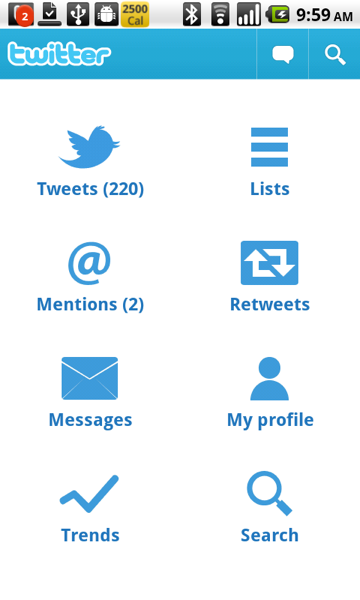
It's a great video, you should definitely watch it. The first pattern that they talk about is the Dashboard. You can see their example of a dashboard in the video, but there was an even more concrete example: Twitter for Android. The Twitter app was released just before IO, and it was developed jointly by Google and Twitter. It showcased the UI patterns that Google wanted designers and developers to start using to help create some expectations for users. Here's the Twitter dashboard:
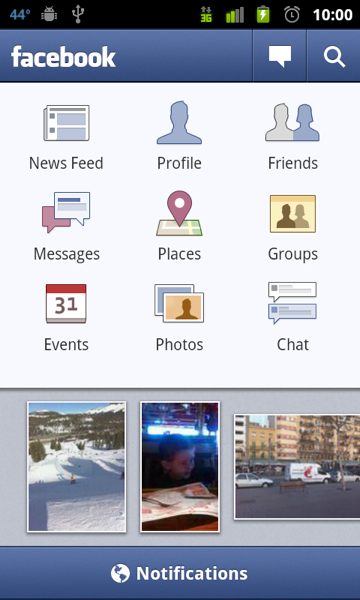
The idea is simple. The home screen of your app provides shortcuts to all of the major components of the app. The combination of using this pattern in a popular app (Twitter has 5M+ downloads) and evangelizing it at the IO conference certainly had the desired results. Many other apps adopted the pattern, including every platform's most popular app, Facebook:
The pattern has been a hit with note-taking/organizer apps like Evernote:
Evernote's more recent competitor Springpad also uses a dashboard:
Evernote and Springpad are both popular apps, with more than 1.5M downloads between them. Another very popular app that uses the dashboard is Yelp:
Google's Yelp/Foursquare compettitor Places also uses the dashboard pattern:
Finally, there's my favorite Android music player MixZing:
MixZing shows that you can be a little creative with the dashboard pattern. So the pattern's been a big success, right? Users are familiar with it and developers have embraced it. So it was a little surprising to me to see that Twitter has now decided that the dashboard is not so good after all:
There's no more dashboard in the 2.0 version of Twitter's app. The release notes allude to the major problem with the dashboard pattern: it forces the user to constantly go to the dashboard if they want to navigate to a different part of the app. It makes everything at least two taps away. Of course it makes it easy for the user to find things, since they can just go to the dashboard to find a shortcut to whatever they are looking for. For example, how do you think you find what's trending on the Twitter app now (go to search) or view your profile (gotta use the dreaded Android menu)? Maybe Twitter has found that their users rarely use these features, so the new design will be more effective for the vast majority of their users.
Speaking of the new design, it obviously uses a tab layout. This is a more common UI pattern in Android and has its own set of APIs to make it easy to use for developers. There are a lot of examples of tab layouts out there, such as Foursquare:
I won't bore you with more examples, as there are a lot. I think it's often very comfortable for a web app going native to use a tab design. It often mimics their website. That's why I picked Foursquare and Bump, two apps that are what I would consider mobile-first. Most people's first interaction with either company is through their mobile apps, not through their desktop web browser.
The other common pattern worth mentioning briefly is what I call Listomania. You start off with lists, and keep going from there like traversing a tree. Here's Google Reader:
Personally I don't find the Listomania format very user friendly. I think it is often a by-product of porting an iPhone app that makes heavy use of UINavigationControllers (in all fairness, many of the tab-using Android apps are the products of porting iPhone apps that used a UITabBarController). I think the dashboard usually solves the same kind of problem (lots of features, hierarchy) in a nicer way. The tab alternative is more of the Pareto principle, putting all of the focus on the most commonly used features. Anyways, it will be interesting to see if the dashboard pattern becomes less common now that it's poster-child has ditched it.
When it comes to Android Cloud-to-Device Messaging, I've found many new and exciting ways to fail and fail hard. So y'know, learn from my failure and stuff:
State: To Have or Not To Have, That is The Question
There are a lot of cool things you can do with C2DM, but of course notifications are one of the most common and most important things. Now remember that unlike on other inferior platforms, you get total control of what happens when a message is pushed to your application via C2DM. So you don't have to show a notification at all. In case you do though, the first thing you need to decide is if your notifications will be stateful or stateless.
What's the difference? Glad you asked. Let's take a simple scenario. A message is pushed to your app via C2DM, and you display a notification to the user. Now Android notifications do not force the user to either open or dismiss the notification. In my opinion that is a very good thing, and I think most folks agree. You might really be interested in a particular notification, but sometimes you've just gotta finish that game of Meteor Blitz or finish posting a crazy picture to picplz. That's not a problem on Android. The sound will go off, the ticker text will scroll across the status bar, and then a simple icon will appear up there and the user can deal with the notification at their convenience. However, let's say that a few minutes later that another message is pushed to your app via C2DM and once again you need to notify the user of this. If you choose a stateless system, then you will simply replace the current notification about message #1 with a new one about message #2. Alternatively you could post a new notification about message #2 that would sit along side the notification about message #1. However if you do this, then you are a schmuck. You've just created an application that can potentially flood the status bar with your notifications. Your app would have be to all kinds of awesome for me to keep it on my phone, especially if I can't turn off your notifications. So don't do that. So really there's only one option if you want to go stateless: most recent notification always wins and anything older goes to the trash.
Don't like that approach? Me neither. That first notification might have nothing to do with the second, and it might be more important. So that means we need to go stateful. With a stateful system, we can remember that we received message #1, and then replace it with a notification that indicates that we have received message #1 and message #2. How you do that will be very specific to your application of course, but you can figure something out. The point is that you persisted the state, that you had received message #1 and it has not been viewed yet, and you use this knowledge to provide a better experience for the user when message #2 rolls in. Of course now the real fun begins.
Watch out for the Clear Button
You need to not only keep track of the messages that you have received via C2DM, but also their state. Has the user seen them or not? What constitutes "seen" is again specific to your application, but it just means that at various places in your application you will need "mark as seen" for certain messages. There is gotcha here and that is the "Clear" button on the status bar. That should have the effect of marking all messages as seen. However, how do you know when the user taps this button? I thought that maybe there was an Intent fired and that I could receive this with a BroadcastReceiver with the proper action/Intent filter. I searched the docs and found no such action, but I still thought that this was probably the case and it was just not documented (there are a lot of such Intent/actions!) I was so stumped that I posted a question on StackOverflow and offered a 50 reputation point bounty. Turns out there is a very simple answer: the deleteIntent field on the Notification object. Talk about face-palm... Anyways you can set a PendingIntent here, and that PendingIntent can start a Service that does the "mark all as read" work for you.
Badging
Android provides a really easy way to badge your notification icons in the status bar. If you just set the number field on the Notification object, you get badging for free. However, badging looks a little ugly, and if you only have one message then you probably don't want it. In that case just don't set the number field and you are good to go. Then the next time a new message comes in, set the number field to 2. Try this out and rut it on your phone. Unless you have a Nexus S, you will notice a problem. The badging will not show up when you set the number 2 (or 3 or 4 or whatever.) This appears to be a bug with Android that was fixed in 2.3. That's why it works correctly on a Nexus S, but not on anything else (the NS is the only phone with 2.3 as of the time I wrote this.) So what do you do? Badge with a 1? Ugly. Don't badge at all? Less informative. The correct answer is workaround.
Actually you might get lucky and do it the "right" way to begin with. What I did was create a Notification with the same ID as the existing Notification, and then simply call notify on the NotificationManager service. That should replace the existing Notification with the new one, and you should get the right badging. This is the case on my Nexus S, so I'm guessing it's the case on Android 2.3+. This is not the case on previous versions of Android. Everything about the old Notification is replaced except for the badging. The work around is to remove the old Notification (using the cancel method on NotificationManager) and then create the new one using notify. That will work on all versions of Android.
Collapse Key
If you read the C2DM documentation, one of the seemingly innocuous things that it mentions is the collapse key. It says this is "An arbitrary string that is used to collapse a group of like messages when the device is offline, so that only the last message gets sent to the client. This is intended to avoid sending too many messages to the phone when it comes back online." Doesn't this sound like this is for the C2DM servers, so they can throttle the messages being sent to your app? Maybe so, but I found that it come in handy on the app as well, as C2DM passes it on to the app. The reason is simple. You may get the same message from C2DM twice. Well I suppose it might even come more than twice, but what's the difference? Regardless you should expect that dupes might be sent, and so you should de-dupe. The collapse key is perfect for this. A good way to keep track of these is to use a static HashMap (depending on how you implement the Service that processes the C2DM messages, you may not be guaranteed that there will only be one instance of that Service, hence a static HashMap) with soft keys, so that if it grows too large the GC will toss old collapse keys that you don't need anymore.
One of my favorite things about Android is that it is not another MVC framework. Now some people find this as a weakness, but not me. I think MVC has its faults. Still many people think of application in terms of MVC, and for them Android's Activity class is as close to a controller as you will get. Pretty much every "screen" or "page" in an Android application has a single Activity behind it (there are exceptions, I know, but bear with me.) Inevitably you need to transition between Activities, and this is one of the places where Android can seem a little weird. You need to create an Intent and then pass that to the startActivity method on a Context object (usually the Activity that you are transitioning from.) That's not too bad. However, it is often the case that a given Activity expects some data -- a model if you like -- that it will use to create the UI (the view if you like.) Let's take a concrete example from Android in Practice. The MediaMogul application (chapter 11) allows the user to create a slideshow by selecting pictures, music, and video from their SD card. Then there is an Activity that plays the slideshow called SlideshowActivity. Here is code from the Activity that starts the SlideshowActivity.
And here is code from SlideshowActivity to retrieve this data:
Intent intent = getIntent();
ArrayList<String> images = intent.getStringArrayListExtra("imageFileNames");
Song song = intent.getParcelableExtra("selectedSong"); // custom Parcelable class
Uri videoUri = intent.getParcelableExtra("videoUri");
There is an obviously ugly issue here. Both Activities need to know the keys (imageFileNames, selectedSong, videoUri) to use to put/get from the Intent's extras. This is such a common thing in Android, even in the framework, that there is a simple pattern for dealing with it. Just use public constants declared in the class that will use the Intent extras:
public class SlideshowActivity extends Activity{
public static final String EXTRA_IMAGE_FILE_NAMES = "imageFilesNames";
public static final String EXTRA_SELECTED_SONG = "selectedSong";
public static final String EXTRA_VIDEO_URI = "videoUri";
...
Intent intent = getIntent();
ArrayList<String> images = intent.getStringArrayListExtra(EXTRA_IMAGE_FILE_NAMES);
// etc.
And then of course in the calling class you would now have:
intent.putExtra(SlideshowActivity.EXTRA_IMAGE_FILES_NAMES, images):
// etc.
Problem solved, right? Well not exactly. You still don't know what the types of the extras should, and you do not know if a particular extra is required or optional. Documenting your code can help with this:
public class SlideshowActivity extends Activity{
  /**
   * An ArrayList of Strings. Required.
   */
  public static final String EXTRA_IMAGE_FILE_NAMES = "imageFileNames";
...
}
So we put the type information and wether the field is required or not as a comment. Wait, doesn't this feel more like Ruby or Python instead of Java? Isn't there some way to use the language syntax and compiler to state this information in a better way instead of relying on code comments? That's where the Static Starter Pattern kicks in:
public class SlideshowActivity extends Activity{
  public static void start(ArrayList<String> images, Song song, Uri videoUri, Context ctx){
    Intent intent = new Intent(ctx, SlideshowActivity.class);
    intent.putExtra(EXTRA_IMAGE_FILE_NAMES, images);
    intent.putExtra(EXTRA_SELECTED_SONG, song);
    intent.putExtra(EXTRA_VIDEO_URI, videoUri);
    ctx.startActivity(intent);
  }
...
}
From this method signature, I know the types of all of the extras and I know that they are all required. If I wanted to make one of them optional, then I could simply overload the start method with only two of the parameters, removing the optional parameter. Of course, somebody could bypass this and still use an Intent.
Now this is not the best pattern for every Activity. The most obvious example is if you want your Activity to be started by other applications. Another application won't be able to invoke a static method. You will have to use the action/Intent-filter path for this. Of course this is pretty rare, how many of your Activities are meant to be started by other apps? Even if this is the case, you can still use the pattern for use within your app.
This pattern is also not limited to Activities. You can do it with Services as well, especially IntentServices:
public class AwesomeService extends IntentService{
  public static void start(String someString, int someInt, Context ctx){
    Intent intent = new Intent(ctx, AwesomeService.class);
    intent.putExtra(EXTRA_SOME_STRING, someString);
    intent.putExtra(EXTRA_SOME_INT, someInt);
    ctx.startService(intent);
  }
}
If your IntentService handles multiple actions, this can be built into the pattern:
public class AwesomeService extends IntentService{
  public static startUploadFile(String someFileName, Context ctx){
    Intent intent = new Intent(ctx, AwesomeService.class);
    intent.setAction(ACTION_UPLOAD_FILE); // ACTION_UPLOAD_FILE is a constant
    intent.putExtra(EXTRA_SOME_FILE_NAME, someFileName);
    ctx.startService(intent);
  }
}
You get the idea. You could extend this to BroadcastReceivers as well. I discussed this pattern a bit with my Android in Practice co-author, Charlie Collins. He liked it too, and pointed out that others have used it as well. Personally, I'm not a fan of static methods or of passing around the Context like that, but the positives seem to outweigh the negatives. What do you think? Useful? Over-engineered?
My last post about buying a Nexus S led to some interesting comments ... on Google Buzz of all places. Actually it was retweeted, I mean rebuzzed? err reposted by my friend Robert Konigsberg at Google... Some of the points there were about comparing the NS and the N1. I argued that the NS had a much better processor (because of its integrated GPU) as well as having the best screen on the market right now. I also incorrectly stated that it had more RAM than the N1, but actually both of them have 512 MB. Here are a few more notable comparisons:
The NS has 1 GB of "internal storage", but this actually part of its non-removable 16 GB of storage. The N1 has 512 MB of internal storage. As many apps only allow you to install them on internal storage (especially any app that has a homescreen widget because of this bug), you have twice as much space for such apps on the NS. However, you cannot upgrade the 16 GB. The N1 has only 4 GB included, but you can upgrade it. In fact, I had already upgraded it to 16 GB.
The biggest thing that I forgot to mention is the reception (both voice and data) on the NS. To me, the N1 and the iPhone 4 both got similar reception -- and that is horrible. The iPhone 4's poor reception is well documented, but I think the N1 was just as bad. If you consider that T-Mobile's network is a step below AT&T's, you get a nasty combination. The NS has much better reception than either of these phones. For that matter, it is much better than any other iPhone I have used (3G/3GS). I'm talking about consistently getting two more bars than the N1, and much clearer and louder reception on the phone. It seems obvious that the use of metal in the outer casing is the key here. Both the iPhone 4 and N1 use metal to destroy your reception.
Some folks have also asked me about battery life. I would say that the NS is slightly worse than the N1, and about the same as an iPhone 3GS. That makes it definitely worse than the iPhone 4. The most obvious culprit here is the screen. Bigger screen = more juice. I came across this amusing blog about switching to the Nexus S from an iPhone. This included a complaint about using the power widget to turn off Bluetooth, Wi-Fi, and even GPS on the phone in order to save battery life. This was kind of shocking to me. As an iPhone user, I almost never turned on Wi-Fi and kept Bluetooth off except when in the car. I had to do this on the 3GS, or I would not make it through the day on a single charge. In fact one of the things that I love about Android is how much easier it is to do these two tasks than on iOS. In fact I always thought that this was a big miss by Apple, but I guess that most people actually leave that stuff on all of the time? I don't understand how anyone who uses their phone much, especially if they receive lots of push email, could get away with leaving all of that stuff on all of the time and not run out of juice by 3 PM. I never tried to do this with the iPhone 4 and its awesome battery, just because I was so used to managing the power on my device. Similarly, I can't imagine NOT charging my phone when I go to bed every night. Anyways, if I manage the Wi-Fi and Bluetooth and charge each night as usual, then the Nexus S makes it through the day easily for me. If I play a lot of games on it or use it as a mobile hotpost, that changes things noticeably.
Finally, some folks didn't like that the NS does not have the glowing trackball that the N1 did. I liked the trackball on the N1. The LED lights weren't that useful, since I get email constantly. Still if I got a blue light, I would know that I got something from Facebook. The trackball was especially useful when there were small parts of the screen that needed to be tapped on. However, I have not found myself missing this on the NS, partially because the screen is bigger, but mostly because the touch accuracy on the screen is very good. I always found the N1 to be slightly worse than the iPhone 4 (which I think is slightly worse than the iPhone 3GS) when it comes to touch sensitivity/accuracy. I think the NS is a little better than the iPhone 4, about as good as the iPhone 3GS.
Recently I was in Los Angeles and took a cab from the airport to my hotel. When I got out of the cab, I left my iPhone 4 in the car. I called the cab company, but they were of no use. I had lost my iPhone. And no, I didn't have the Find My iPhone feature enabled on my iPhone. It's actually a pain to do that, if you don't use MobileMe.
Fortunately being a mobile developer, I had another phone with me, my Nexus One. I've been carrying two phones for awhile. I only used apps on the N1, and mostly just phone features on the iPhone (not a good use of an iPhone, especially the iPhone 4.) I stuck with most of my app usage on the N1, since I thought it would make me a better Android developer. Now all I had was an Android phone.
I moved my phone number to the N1, which was on T-Mobile. Just so you know, I immediately got hit with the dreaded early termination fee. I didn't get an option to keep paying for the line of service.
So now I was in no-contract land, and I had a lot of options. I could buy another iPhone, even one on Verizon. I could wait until some of the new Android phones announced at CES were out. I was in no hurry because I had my N1. Instead of doing those things, I decided to buy a Nexus S. Here's why.
I think the Super AMOLED screen is by far the best out there. I had the iPhone 4 for six months, and I wasn't very impressed with the Retina Display. You can't make use of all of those pixels on such a small screen. Yes text looks great, but the colors are washed out and I definitely noticed that a lot more than the awesome text rendering.
I love that the Nexus S runs stock Android. No crap on it. I dislike SenseUI. I can tolerate TouchWiz, but I'm no fan. There are also no carrier crap, like the NASCAR app on Sprint 's phones. The only disadvantage of stock Android is the camera app. In comparison, I think the camera app on the Galaxy S and Galaxy Tab is excellent. But hey it's Android, I can always customize.
I thought about getting a 4G phone. However I don't think it's worth it. Especially since I get to use the Nexus S's wireless hotspot feature for free. Plus I think all phones suffer when they transition from 3G to edge, and I think that problem would be much worse with 4G which will be spotty on any network for awhile.
Obviously the Nexus S is ideal for a developer as well. So the Nexus S it is! In fact, I wrote this blog post on it.